The BeAutomated journal
Minute Zero Lead Follow Up for SMBs, Reply Detection, Managed Service
Lead follow up automation for SMBs: reply within minutes, detect replies, and trigger real time handoffs. Pilot ready build, KPIs and tests.
Minute Zero Lead Follow Up for SMBs, Reply Detection, Managed Service

Lead follow-up automation works when it does three things: acknowledge every enquiry within minutes, run a sequence that adjusts to how a lead behaves, and hand the lead to a human the moment intent shows up. Most systems fail on the third point. Your first move today: turn on instant acknowledgement and reply-detection in whatever tool you already use, before you touch anything else.
TL;DR:
- Responding to inquiries within five minutes remains crucial, and automating immediate acknowledgements ensures this window is consistently met.
- Segmentation based on lead source and intent is essential to tailor follow-up cadences and avoid generic outreach that underperforms.
- Automated workflows should include reply detection and exit rules to prevent messages after a prospect has responded or shown clear intent.
- Building a clean, single-source contact record and integrating multi-channel systems is key for reliable, real-time automation.
- Focusing on high-intent leads during the first 90 days maximizes automation ROI before expanding to lower-priority or high-volume outreach.
BeautomatedRecover More Missed EnquiriesBeautomated helps Australian businesses automate follow-ups and streamline communication, so potential clients can receive prompt responses.Learn more about Beautomated
Table of Contents
- What lead follow-up automation does and why it matters for SMBs
- Key components every reliable system must include
- How do you build a follow-up sequence in your automation tool?
- When should automation hand a lead to a human?
- Measure, test and iterate: the KPIs that actually move conversion
- How Beautomated builds these systems for Australian businesses
- Author perspective: pragmatic priorities for the first 90 days
- Get a pilot running before you commit to a full build
- Sources
- FAQ
What lead follow-up automation does and why it matters for SMBs
Speed decides more deals than most sales managers admit. Being first to respond to an enquiry has long been recognised as one of the strongest predictors of whether that lead ever becomes a customer, and yet plenty of businesses still let enquiries sit in an inbox overnight. Automated lead nurturing closes that gap by sending an acknowledgement the second a form is submitted or a call is missed, then keeping the conversation moving without anyone needing to remember to follow up.
The bigger win is consistency. A manual process depends on whoever’s at their desk that day. Automated lead follow-up removes that variability, and it does more than just send messages on schedule:
- It reduces lead leakage by making sure nobody falls through the cracks between “enquired” and “spoke to a rep.”
- It keeps your contact data clean through deduplication and enrichment as new details come in.
- It gives the whole sales team visibility into where every lead sits in the pipeline.
The pitfalls show up fast if you build this lazily. Running the exact same cadence for a cold web visitor and a hot pricing enquiry is a common mistake, and skipping reply-detection is worse. Nothing damages trust faster than an automated email arriving after the prospect already replied.
Key components every reliable system must include
A follow-up workflow is only as good as the plumbing underneath it. Before you build a single sequence, get these components in place.
- A canonical contact record. One single source of truth per lead, not five half-updated versions across your inbox, spreadsheet and CRM.
- Segmentation and enrolment triggers. Rules based on lead source, intent signals, or a lead score decide which sequence a contact enters.
- A multi-channel sequencing engine. Email, SMS, WhatsApp and phone need to work together, not as separate silos with separate logic.
- Reply detection, suppression lists and consent checks. These stop the automation from talking over a live conversation or messaging someone who’s opted out.
- Integrations. Your CRM, calendar, SMS or WhatsApp provider and telephony system all need to sync in real time, not on a nightly batch.
Automated follow-up that actually works tracks each lead’s current state and lets multi-channel triggers adjust in real time based on clicks, opens and replies, rather than firing blind on a fixed timer.
Pro Tip: Before you build a single email sequence, map your canonical contact record first. Every workflow you build afterwards depends on that data being clean, and retrofitting it later means rebuilding every automation you’ve already shipped.
How do you build a follow-up sequence in your automation tool?
Segment before you sequence. Building one blanket workflow for every enquiry is the single biggest reason follow-up automation underperforms. Set up a separate workflow for each lead source and intent level (website enquiry, phone missed call, high-intent pricing request) so the cadence actually matches how ready that lead is to buy.
Here’s a sequence structure that works across most marketing automation platforms, including HubSpot and ActiveCampaign:
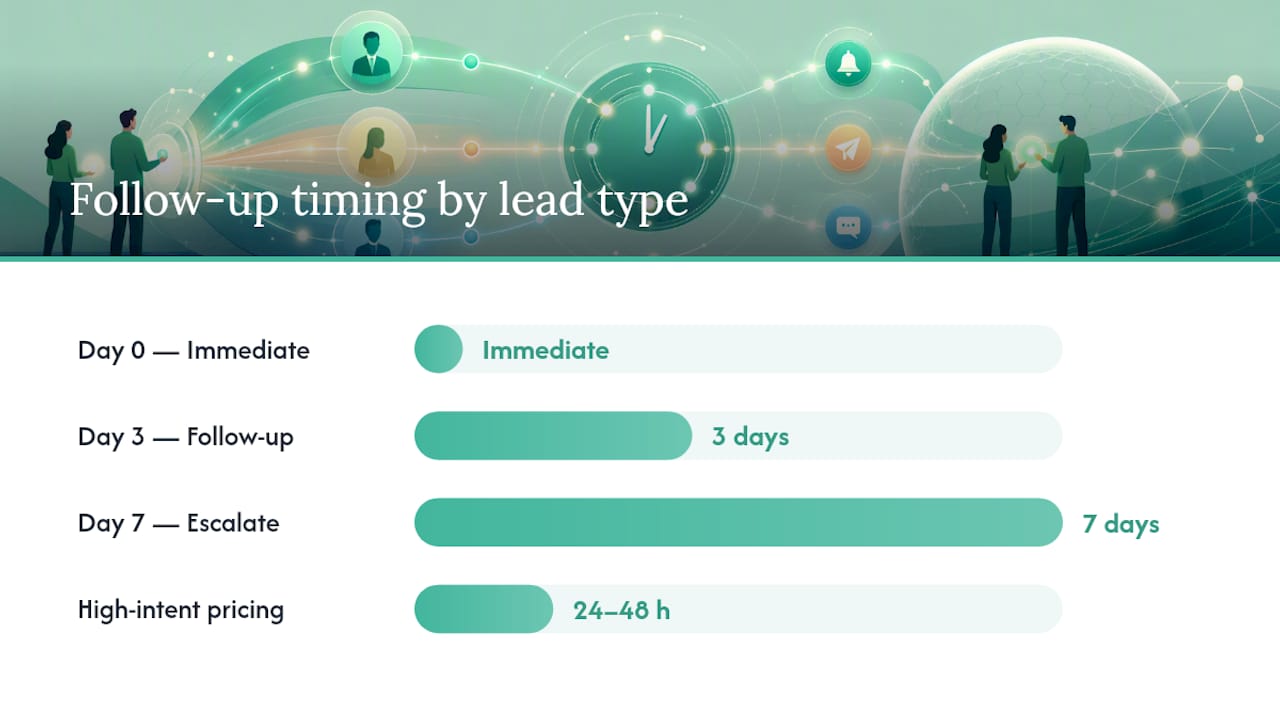
- Day 0: Immediate acknowledgement. The moment a lead enters the workflow, send an automated email (and SMS, if the channel’s available) confirming you’ve received their enquiry and telling them what happens next.
- Wait and check. Before the next send, add a condition: has an owner been assigned, or has the lead replied? If yes, exit the workflow immediately.
- Day 3: Follow-up touch. If no owner has picked it up and there’s been no reply, send a second message with more specific value: a case study, an answer to a common question, or a direct offer to book time.
- Wait and check again. Same condition check. Owner assigned or reply received means the automation stops.
- Day 7: Escalate or hand off. If the lead is still unowned, either send a final check-in message or create a task that pushes the lead directly to a sales rep for manual follow-up.
For high-intent segments, this timeline compresses hard. A lead who asks about pricing in chat should hear back within 24 to 48 hours, with the sequence accelerating toward a meeting request within about a week rather than stretching out over a longer period.
Two more things to build in before you switch anything live. First, enrolment filters that stop a lead re-entering a sequence they’ve already been through, which otherwise creates duplicate emails and an annoyed prospect. Second, every automated action needs a clear list of what it can actually do: send an email or SMS, create a sales task, assign an owner, or stop the automation outright. If a step doesn’t map to one of those actions, it doesn’t belong in the workflow.
When should automation hand a lead to a human?
The exit point matters more than the sequence itself. Automation should hand off the moment a lead shows real intent, and that means building both behaviour-based and score-based triggers into the workflow from day one.
Behaviour-based triggers fire on what the lead actually does:
- Clicking through to a pricing page more than once.
- Requesting a demo or booking a call directly.
- Replying to any message in the sequence.
- Visiting your site repeatedly within a short window.
Score-based triggers work differently. Once a lead crosses your marketing-qualified-lead (MQL) threshold, the standard pattern is to stop the nurture sequence, assign an owner and fire a CRM notification so a rep picks it up without delay. Calibrating that threshold takes a bit of trial and error. Set it too low and reps drown in unqualified handoffs; set it too high and hot leads sit in automation too long.
Route the actual notification through whatever your team already checks constantly. That’s usually a Slack alert, a CRM task, or an email to the assigned rep, fired the instant a trigger condition is met.
Your exit rules need to cover four scenarios without exception: the lead unsubscribes, the lead replies, a deal gets created in your CRM, or the sequence simply finishes without any of the above happening. Reply detection deserves special mention here. It’s the single safeguard that prevents the most embarrassing failure mode in automated follow-up: a scripted email landing in someone’s inbox minutes after they’ve already replied to your last message.
Measure, test and iterate: the KPIs that actually move conversion
Four numbers tell you whether your lead nurturing automation is working: response rate, meeting conversion rate, median time-to-handoff, and your unsubscribe and deliverability metrics. Track all four weekly, not monthly, because deliverability problems compound fast if they go unnoticed.
Once you’ve got a baseline, start testing systematically:
- Run A/B tests on subject lines to see what actually gets opened versus ignored.
- Test channel order, email first versus SMS first, to see which sequence gets faster replies.
- Experiment with timing windows: does a Tuesday morning send outperform a Friday afternoon one for your audience?
Watch segment behaviour closely enough to know when to compress or extend a sequence. If a segment consistently replies by day two, a seven-day sequence is wasting time and annoying people who’ve already moved on.
Deliverability needs active protection, not a set-and-forget approach. Staggering send times, varying message phrasing so every email isn’t identical, personalising beyond a first-name merge field, and using reply-detection to pause sends are all techniques that reduce the chance of tripping bulk-mail spam heuristics. Monitor hard bounces and keep suppression lists current, because a rising bounce rate drags down every sender’s reputation, not just the one campaign that caused it.
How Beautomated builds these systems for Australian businesses
A common approach for established businesses includes AI-driven automation to improve replies and enquiry handling, organic visibility efforts to help AI search tools find your business, and sponsored ChatGPT placements for added discoverability. The Speed-to-Lead AI service sits at the centre of the automation tier, built specifically around minute-zero response and the handoff logic covered above.
A managed engagement makes the most sense once lead volume climbs past what one person can track manually, or once routing gets complicated by multiple sources, sectors, or intent tiers. Certain sectors such as mortgage brokers and solar sales teams have implemented reply-detection and exit rules into real workflows rather than leaving them as theory. Founder-level involvement can mean the person configuring handoff triggers is accountable for their effectiveness.
Author perspective: pragmatic priorities for the first 90 days
Spend your first 90 days tuning segments and handoff triggers, not chasing every channel at once. Prioritise your highest-intent leads first. That’s where automation pays for itself fastest. Hold off on high-volume automated calling until your deliverability and consent processes are genuinely solid. Rushing that part causes more damage than the slow follow-up it’s meant to fix.
— Billy
Get a pilot running before you commit to a full build
Beautomated is the alternative to a slow, trial-and-error build for lead follow-up automation: instead of spending months configuring workflows yourself, a small pilot validates the whole system with an audit, a sequence build, handoff rules, and measurement in place from week one.

A typical pilot covers an audit of your current response times and lead sources, a working sequence built around your actual enrolment triggers, the handoff and exit rules that stop automation from talking over a live rep conversation, and a measurement setup so you can see response rate and time-to-handoff improve from day one. If your business has a backlog of old enquiries that never got proper follow-up, AI Database Reactivation is built specifically to turn that dead list back into pipeline. For the core build, start with AI Automation to see how the pilot structure works for a business your size.
FAQ
What is the best way to follow up with a lead?
The most effective approach combines an immediate automated acknowledgement with a sequence that adjusts to intent, backed by reply-detection so no message goes out after the lead has already responded.
What is the 5-minute rule for leads?
It’s the principle that contacting a lead within five minutes of enquiry dramatically increases the odds of a meaningful conversation, since interest and attention fade fast after that window closes. Automated acknowledgement is how most businesses now hit that window consistently.
What does lead automation mean?
Lead automation means using software to track a lead’s behaviour and status, then triggering the right message, channel, or handoff to a rep automatically instead of relying on someone to remember to follow up manually.
What are the main types of leads in sales?
Leads are commonly grouped by source and readiness, such as cold leads, marketing-qualified leads (MQLs), sales-qualified leads (SQLs), and existing customers being reactivated. Segmenting your automation by these categories, rather than running one generic sequence, is what separates automated lead nurturing that converts from automation that just sends noise.
Does Beautomated build custom follow-up automation for small businesses?
Yes. Beautomated configures automated lead follow-up systems including Speed-to-Lead AI for instant response, with pricing available on request through the site.